Adobe, ChatGPT and Claude: What the New Collaboration Means for Your Marketing

The Adobe ChatGPT and Claude collaboration is changing how businesses make marketing content. Posters, social posts, ad images and PDFs can now be created and edited inside a chat, using Adobe’s tools. Drafts arrive faster, but faster drafts alone do not bring enquiries.

This guide explains what the Adobe ChatGPT and Claude collaboration includes, what it means for your ads and social media, and where an agency like DigiDwar still makes the difference.

What Is the Adobe ChatGPT and Claude Collaboration?

It is not one joint product. Adobe built two separate integrations, one for each assistant.

Adobe in ChatGPT Adobe in Claude
Launched December 10, 2025 April 28, 2026
Adobe tools Photoshop, Adobe Express, Acrobat 50+ tools across Photoshop, Illustrator, Firefly, Express, Premiere Pro, Lightroom, InDesign and Adobe Stock
How you use it Type the app name, then your instruction Add the “Adobe for creativity” connector, then describe the result
Access Free to ChatGPT users, according to Adobe Claude account required; Adobe account optional

In simple words: you describe the result you want, and the assistant runs the Adobe tools for you. Results can be moved into Adobe’s own apps for finishing.

What Can You Create with the Adobe ChatGPT and Claude Collaboration?
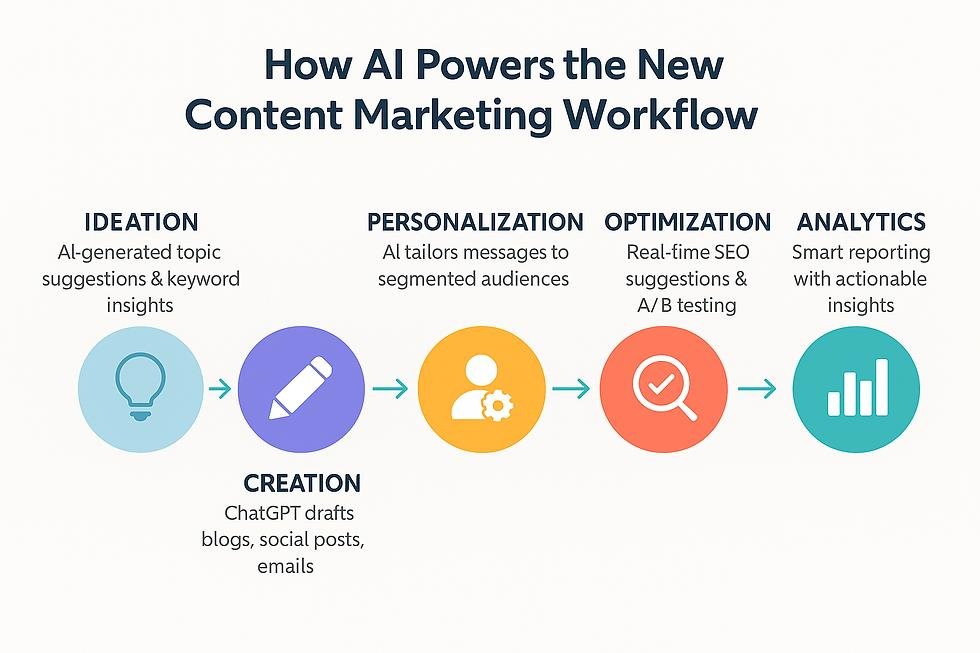
Five-step AI-powered digital marketing content workflow using Adobe Express for social media design

From campaign brief to published post: simplify your digital marketing workflow with AI and Adobe Express.

  • Social posts and offer posters: Start from Adobe Express templates, then change the text, swap images or add simple animation.
  • Photo edits: Use Photoshop tools to fine-tune an image, apply effects or clean up a product photo.
  • PDF documents: Merge, compress and edit PDFs, extract tables and redact sensitive details with Acrobat.
  • Video and vector work (Claude): The connector also reaches Premiere Pro for video and Illustrator for vector graphics.

What the Adobe ChatGPT and Claude Collaboration Means for Your Marketing

For a business, the main change is speed at the first-draft stage.

  • Social media: You can draft posts and offer graphics in minutes. A steady posting plan and a consistent look still need planning.
  • Meta and Google Ads: You can produce several ad image versions to test. Results still depend on targeting, budget, tracking and optimisation.
  • Content and creative: First drafts are quick. Brand tone, accuracy and approval stay with people.
  • Website and SEO: Better visuals help a page look professional. Search traffic still comes from strategy, useful content and technical setup.
  • Documents: Quotes and brochures can be tidied and shared faster.

Example: A shop in Greater Noida wants a Diwali offer. The owner makes a poster in a chat within minutes. But who will see it? Which ad audience should get it? How will the team track the enquiries it brings? Those answers decide the result, not the poster.

Why Fast Creatives Are Not Enough

AI tools reduce production time. They do not decide your message, audience or budget.

  • Accuracy: AI can get text, prices and dates wrong. Check every detail.
  • Brand consistency: One poster is easy. A full campaign that looks like one brand needs a clear style.
  • Complex work stays in the apps: Detailed layouts and print files still need Adobe’s own tools.
  • Privacy and rights: Avoid uploading customer data and confirm usage rights before commercial use.
  • Design is one part of marketing: Enquiries come from the right audience, a clear offer and quick follow-up.

How DigiDwar Helps You Use the Adobe ChatGPT and Claude Collaboration

Use the AI tools for quick drafts. Use an agency for the parts that turn creatives into customers.

Your goal What the AI tools give you What DigiDwar adds
More enquiries from ads Ad image drafts Meta Ads and Google Ads setup, targeting, tracking and optimisation
A steady social media presence Individual posts Social media management and content planning
A professional, consistent brand First drafts Content and creative that follow your brand
Getting found on Google Not covered SEO for your website and service pages
Knowing what works Not covered Marketing analytics and reporting

If you want to use these tools without guessing what works, talk to DigiDwar. We offer a free initial consultation to discuss your goals, content and budget.

How to Try the Adobe ChatGPT and Claude Collaboration in 5 Steps

  1. ChatGPT: Open ChatGPT, start your message with “Adobe Express” or “Photoshop”, and upload your image or describe the design.
  2. Claude: On the Claude website or desktop app, open Settings, then Connectors, find “Adobe for creativity” and add it. Set it up on the web or desktop, not the mobile app.
  3. Give clear details: Mention the size, platform, colours, tone and the exact text, price and contact number.
  4. Review and refine: Ask for one change at a time, such as a shorter headline.
  5. Check before posting: Review every detail, then publish or send the file to your marketing team.

Adobe ChatGPT and Claude Collaboration: FAQs

Is this one partnership between Adobe, ChatGPT and Claude?

No. Adobe has separate integrations with ChatGPT and with Claude. Together they show a clear trend: creative software is moving into AI assistants.

Is Adobe in ChatGPT free?

Adobe launched Photoshop, Express and Acrobat in ChatGPT as free to ChatGPT users. Terms can change, so check Adobe’s announcement and Adobe’s current pages.

Do I need an Adobe account to use Adobe in Claude?

No. A Claude account is required. An Adobe account is optional, but connecting one unlocks additional tools, higher usage limits and saving across sessions. See Adobe’s connectors page for details.

Can these tools replace a marketing agency?

No. They speed up drafts. Strategy, ad management, tracking and brand judgement still depend on people.

Will AI-made posters bring more customers?

Not by themselves. Results depend on your offer, audience, targeting and how quickly you answer enquiries.

Final Thoughts
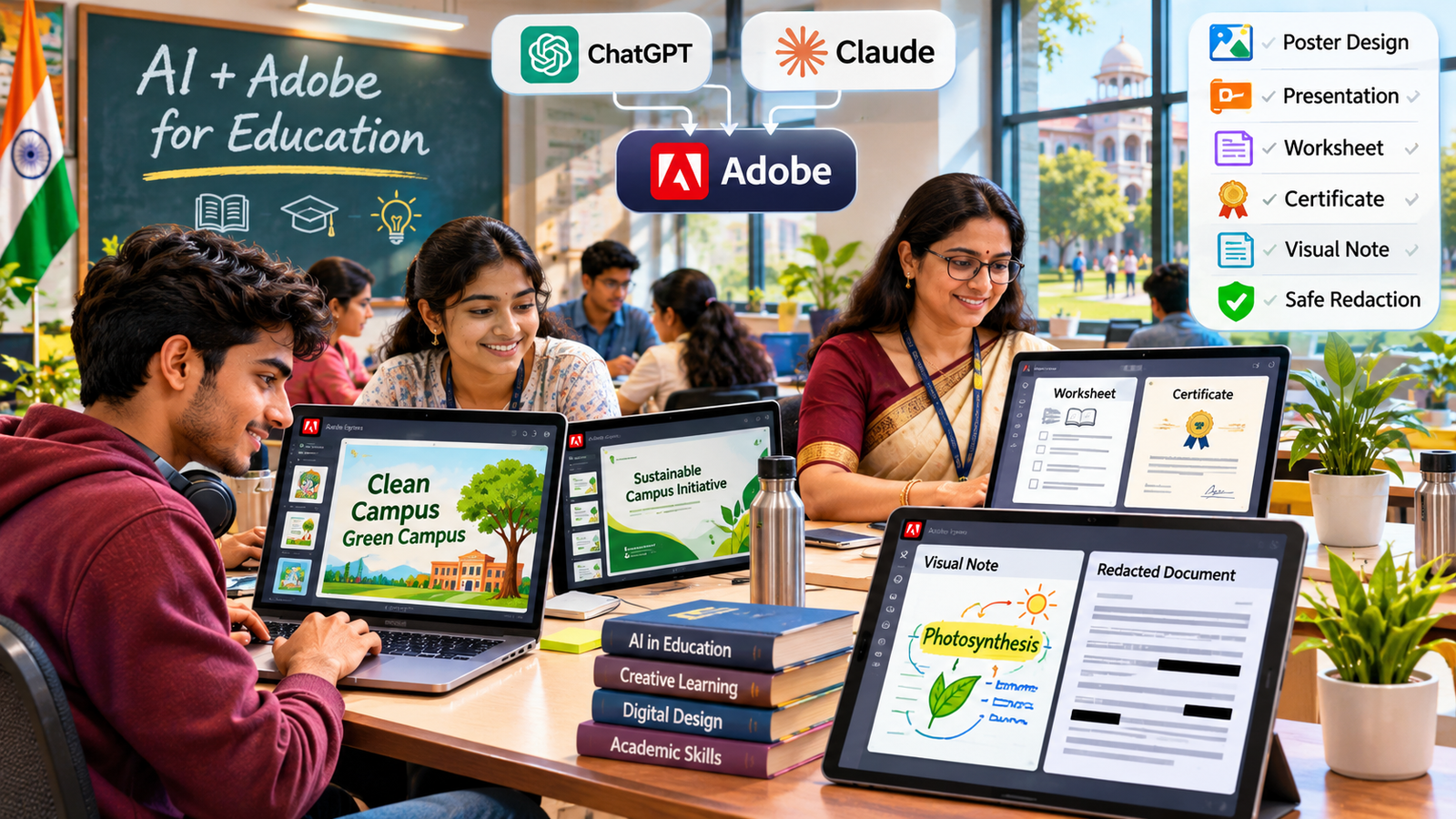
Indian students and teachers using AI and Adobe tools for educational posters presentations worksheets and certificates

AI-assisted creative tools help students and educators explore digital design, presentations and visual learning.

Adobe, ChatGPT and Claude are not one joint product, but they point the same way: describe the result, and let the tools do the routine steps. Businesses that learn to use the Adobe ChatGPT and Claude collaboration well will make content faster. Those that pair it with a clear marketing plan will turn it into enquiries. For a wider view, read our guide on how AI is changing marketing, business and learning.

Want to understand how AI-assisted content connects with search visibility? Read our guide to AI marketing and AEO for practical steps on creating useful content and answering customer questions.

Ready to turn faster creatives into real enquiries? DigiDwar in Greater Noida helps businesses with Meta Ads, Google Ads, SEO, content and social media. If you also need a website, see our website development service. Contact DigiDwar or call +91 87896 19750 for a free initial consultation.
Website Development Company in Greater Noida: What to Expect

Choosing a website development company starts with understanding what your business needs its website to achieve. You might need to explain your services, display your work, receive enquiries or sell products online.

DigiDwar is based in Gaur City, Greater Noida, and provides website design and development for businesses across Greater Noida, Noida and Delhi NCR. This guide explains what a business website should include and what to check before hiring a developer.

What Should Your Website Design Include?

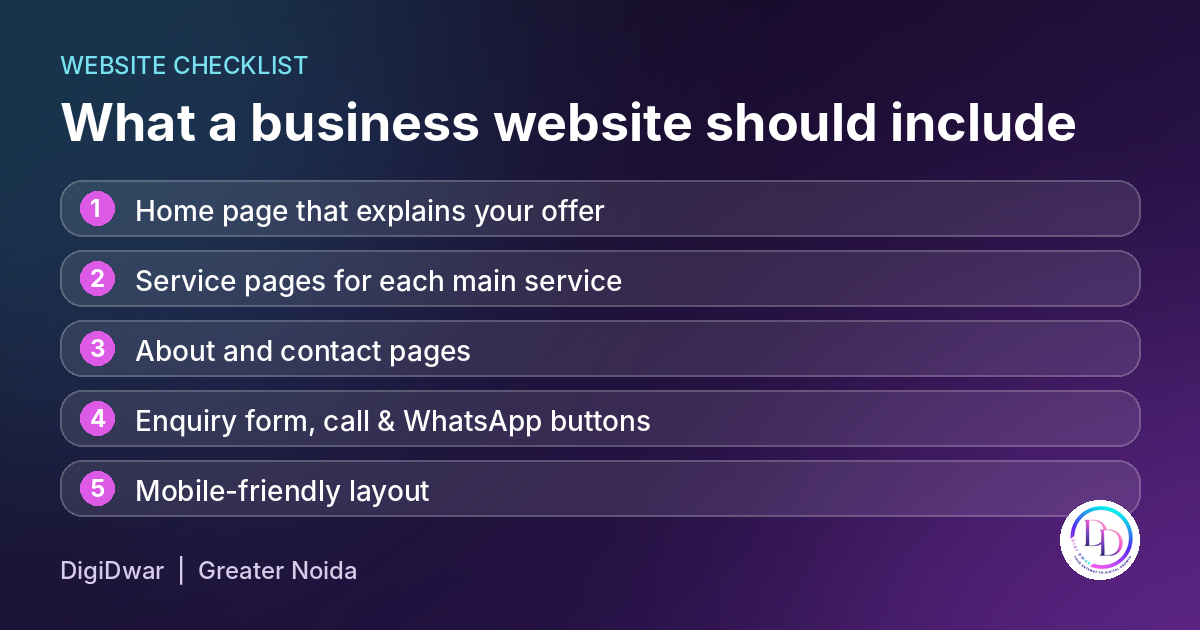
Checklist of what a business website should include - DigiDwar Greater Noida

Good web design helps visitors find information and understand what to do next. The appearance matters, but so do readable content, clear navigation and working contact options.

A typical business website should include:

  • Explain your services and audience on the homepage.
  • Create individual pages for your main services.
  • Introduce your business on an about page.
  • Include accurate business details on the contact page.
  • Add enquiry forms and call or WhatsApp buttons.
  • Make the layout work on mobile phones and desktop screens.

Ask the developer to test the forms, buttons and navigation before launch. Website design should support the way customers use your site. Accessibility also matters. The W3C accessibility checks explain basic checks for page titles, image alternatives, headings and keyboard access.

Web Design and Web Development: What Is the Difference?

Web design covers a website’s appearance and layout, including colours, typography and navigation.

Development brings that design to life. This work includes building pages, setting up forms and making the required features function correctly.

You may also encounter UI/UX design. User interface design concerns the elements people interact with, while user experience considers how easily they can complete tasks.

When comparing proposals, ask which of these activities are included. For example, a design mockup and a completed, tested website are different deliverables.

Website Development Packages: What Is Included?

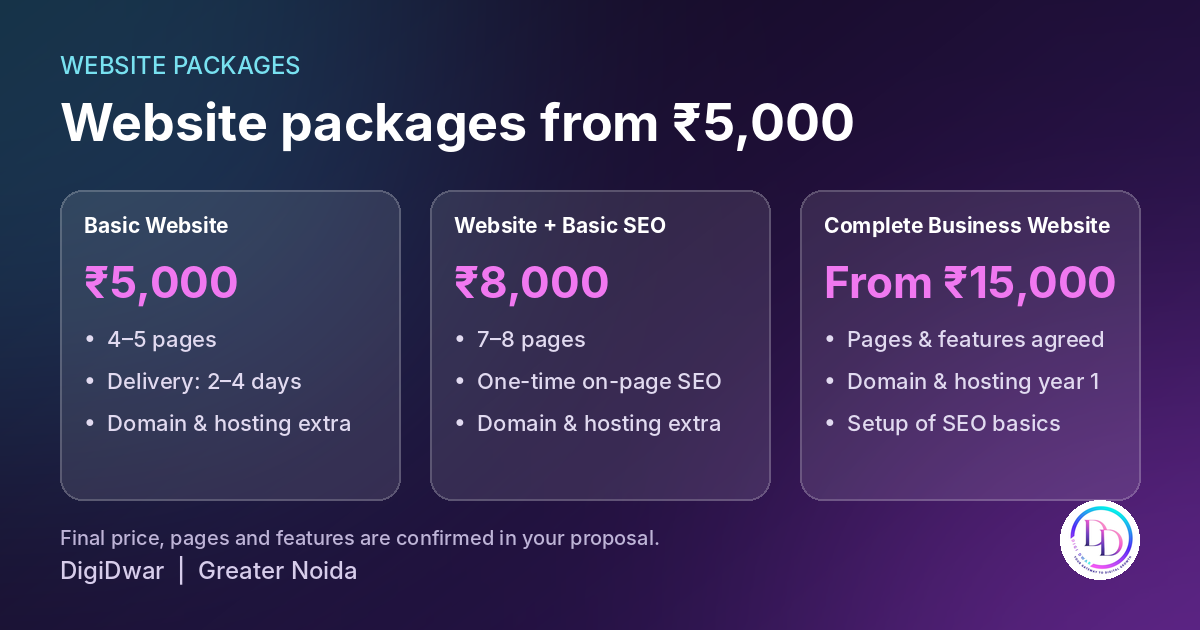
Website packages from ₹5,000 by DigiDwar Greater Noida

Compare the scope of each website development company alongside its price. Page counts alone will not tell you whether a package meets your requirements.

Package Starting price Main inclusions
Basic Website ₹5,000 4–5 pages; estimated delivery of 2–4 days
Website with Basic SEO ₹8,000 7–8 pages and one-time on-page SEO setup
Complete Business Website ₹15,000 Agreed pages and features, with domain and hosting for the first year

Domain and hosting are charged separately in the first two packages. Before work begins, your proposal should confirm the final scope, price, delivery conditions and support.

For a detailed breakdown, read our website development cost guide for Delhi NCR.

Business Websites, Portfolio Websites and Ecommerce Websites

Different website types need different planning.

Business Websites

A service business usually needs pages explaining its services, service areas, experience and enquiry process. Clear information helps potential customers assess whether the company meets their requirements.

Portfolio Websites

Portfolio websites display selected work for designers, photographers, consultants and other professionals.

A useful web portfolio explains the brief, your role and what you delivered. Include genuine examples and obtain permission before sharing confidential client material.

Ecommerce Websites

Ecommerce websites need additional planning for product information, stock, payments, delivery and order management.
Therefore, discuss your online store requirements before choosing a package.Confirm the platform, integrations, recurring charges and support in a separate agreed scope.

How to Choose a Website Development Company

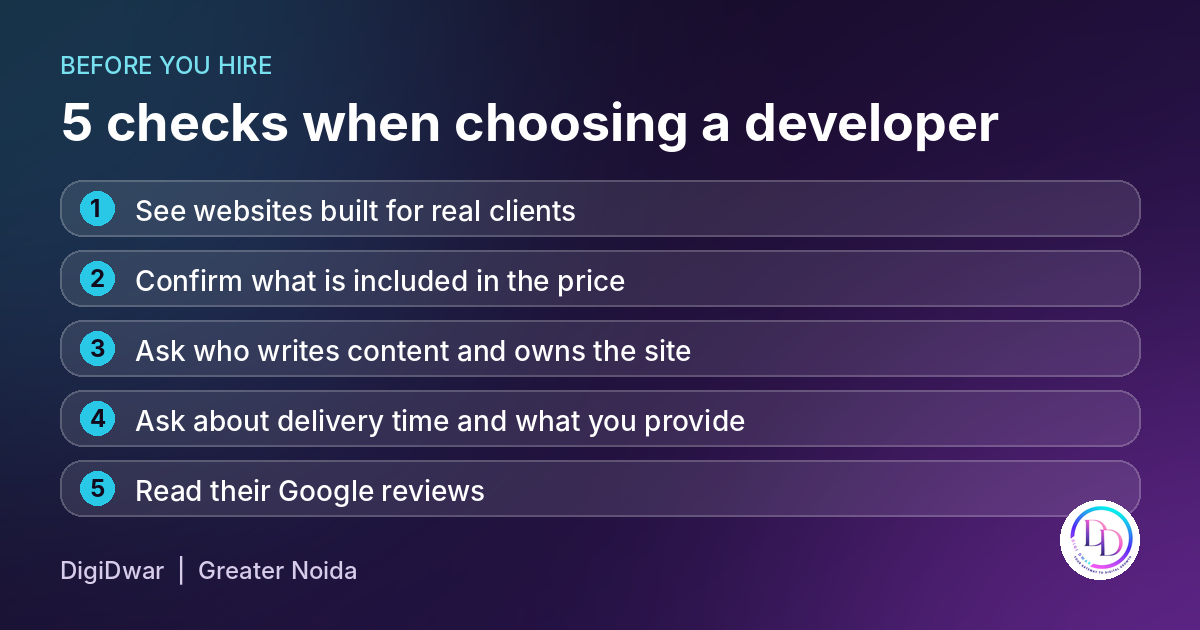
5 checks when choosing a website developer in Greater Noida

If you are comparing options for website development company in Noida, review the work, responsibilities and handover process before deciding.

Review the Website Development Company’s Projects

First, review sample websites on both your phone and desktop. Next, check whether the pages are readable, navigation is clear and contact options are easy to find. Visual effects should also serve a purpose. For example, explore DigiDwar’s client portfolio, including our website development work for Universal Manpower Services.

Confirm the Full Scope

Ask whether the quotation includes:

  • Website design and development.
  • Content writing or content entry.
  • Mobile layout adjustments.
  • Enquiry forms and required integrations.
  • Basic SEO setup.
  • Testing and handover.
  • Post-launch support.

Also, confirm any additional costs before work begins.

Confirm Ownership with Your Website Development Company

Agree on who owns the domain, hosting account and completed website. Before handover, confirm which administration details you will receive. Also, ask your website development company to explain any platform or licensing restrictions that affect ownership or maintenance.

Discuss Timelines and Revisions

First, ask what information is needed to begin, how approvals work and which revisions are included. Delivery depends on the agreed features and the availability of content, access and feedback. Therefore, confirm a realistic schedule before work starts.

Searching for a Website Development Company Near You?

Location can matter if you prefer local discussions or a developer familiar with your service area. However, proximity should be considered alongside relevant work, communication and the written proposal.

DigiDwar is based in Greater Noida and works with businesses across Noida and Delhi NCR. Share your requirements so we can discuss the suitable scope and working arrangements.

What to Prepare Before Hiring a Website Development Company

Before hiring a website development company, prepare:

  • Your business details and target audience.
  • The main purpose of the website.
  • Required pages and functionality.
  • Approved text, logo and photographs.
  • Examples of layouts you find useful.
  • Your budget and preferred timeline.
  • Details of any existing website or domain.

Our website launch checklist can help you organise these materials.

Discuss Your Website with DigiDwar

Whether you need a business website or want to discuss a portfolio or online store, start with a clear brief.

Explore DigiDwar’s website development services or contact us for a free initial consultation.

Call +91 87896 19750 to discuss your project.

Website Development Cost in Delhi NCR: Packages and Pricing

A ₹5,000 website and a ₹15,000 website may look similar in a quotation until you check the details. Does the price include hosting? How many pages will you get? Can customers send enquiries? Who pays for renewals? This guide explains website development cost in Delhi NCR and what affects the final price.

At DigiDwar, our business website packages start at ₹5,000, with a ₹8,000 option that includes basic SEO and a complete business website package starting at ₹15,000. These are our own package prices, not an estimate of what every agency in Delhi NCR charges.

This guide explains what each package includes and which questions to ask before you commit to a project.

Website Development Cost in Delhi NCR: Compare DigiDwar Packages

Detail Basic Website Website + Basic SEO Complete Business Website
Development price ₹5,000 ₹8,000 From ₹15,000
Pages 4–5 7–8 Agreed in the proposal
Content Supplied by you and organised across the included pages Supplied by you and organised across the included pages Responsibilities agreed in the proposal
SEO setup Not listed as a package inclusion One-time basic on-page SEO One-time technical and on-page SEO
Domain and hosting Charged separately Charged separately First year included; selected domain and plan confirmed in the proposal
Enquiry form and WhatsApp/call buttons Confirm requirements in your proposal Confirm requirements in your proposal Included
Estimated delivery 2–4 days 3–4 days Approximately 5 days

Delivery estimates begin after we receive the necessary content, images, access and approvals. Your proposal confirms the final price, features, page count and applicable taxes. Larger projects and additional integrations may take longer.

You can review the full scope on our website development in Delhi NCR page.

When is the ₹5,000 Basic Website suitable?

This package is for a business that needs a straightforward website to explain its services and share contact information.

It includes 4–5 pages, with the page structure and navigation planned around your business. We organise the text and images you supply across those pages. Domain and hosting are charged separately.

For example, a business might need a homepage, an about page, a service overview and a contact page. The exact page selection depends on what customers need to know before contacting you.

Before choosing this package, tell us whether you need a form, an editable blog or a particular integration. Those requirements should be recorded in the proposal rather than assumed from the package name.

What does the ₹8,000 Website + Basic SEO package add?

A business offering several services may need separate pages to explain each one. This package includes 7–8 pages and a one-time basic on-page SEO setup.

The SEO work covers page titles and meta descriptions for the included pages, a clear heading structure, relevant internal links and descriptive image alt text where appropriate. Domain and hosting are separate costs.

A security and housekeeping business, for instance, may benefit from explaining the two services on separate pages because visitors have different questions about each. The page structure should follow the business’s actual services.

The one-time setup does not include continuing keyword research, new articles or monthly performance management. Those activities require a separate SEO services agreement.

What is included in the package starting at ₹15,000?

The Complete Business Website package brings development and launch setup together. Page count and features are agreed in your proposal.

It includes:

  • Mobile-responsive design.
  • An enquiry form and WhatsApp/call buttons.
  • Domain and hosting for the first year.
  • SSL setup and basic speed optimisation.
  • Sitemap setup and Search Console connection.
  • Page titles and meta descriptions.
  • One-time technical and on-page SEO setup.

This package may suit a business that wants these launch requirements handled within one agreed project. Custom booking systems, payment functionality, dashboards and other integrations still need a specific scope and quotation.

The first year of domain and hosting does not include unlimited future changes. Renewal costs, maintenance and continuing support should be confirmed before work begins.

What Changes the Website Development Cost?

Page count and the information on each page

A short service overview and a detailed service page require different amounts of work. Product catalogues, location information, case studies and additional content can expand the project even when the design remains similar.

Agree on a page list before development. It gives both sides a clearer basis for the quotation and review process.

Content and images

Our Basic Website and Website + Basic SEO packages organise the material you supply. Writing new copy, sourcing additional images and creating brand materials need to be discussed separately.

Prepare accurate service descriptions, contact details, your logo and photographs you have permission to use. Missing information can delay the project even after the layout is ready.

Features and integrations

An enquiry form has a different scope from a customer dashboard. Online payments, appointment systems, membership access and third-party integrations can affect both development and future running costs.

Describe how a feature should work. For a booking requirement, explain whether visitors submit a request or select a confirmed available slot. That difference helps establish the work involved.

Revisions and future changes

Ask how design feedback will be collected and which revision rounds are included. A request to adjust an approved layout differs from adding a new service section or changing the project’s purpose.

The proposal should also explain how changes after handover will be quoted.

Domain, Hosting and Renewals: Extra Website Development Cost.

Your domain is your website address. Hosting provides the server space used to run the website. These costs should be considered separately from development unless your package explicitly includes them.

For DigiDwar’s ₹5,000 and ₹8,000 packages, domain and hosting are charged separately. The package starting at ₹15,000 includes the first year, with the selected domain and hosting plan confirmed in your proposal. Renewals after that year are charged separately.

Ask for the actual renewal amount for your selected services. It depends on the domain extension, hosting plan, provider and any optional subscriptions. A first-year offer should not be treated as the permanent annual price.

A practical budget is:

First-year total = development + separately charged domain/hosting + agreed extras + applicable taxes.

For later years, budget for renewals, any paid tools and the maintenance or changes you choose. Where a cost is already included in the package, do not count it twice.

Should you choose WordPress or custom PHP?

WordPress can suit a business that wants to publish articles or update supported content through an editor. Before choosing it, confirm which parts of your particular website you will be able to edit yourself.

Custom PHP can suit a specific layout or functionality. Unless an editing dashboard is included, content changes may require developer assistance.

We discuss your budget, required features and editing needs before recommending an approach. The platform alone does not determine search visibility or enquiry performance; implementation and the information on your pages matter too.

Does website development include ongoing SEO?

The ₹8,000 package includes basic one-time on-page SEO. The complete package includes the agreed one-time technical and on-page setup.

Ongoing SEO is separate. It involves reviewing search performance, improving relevant pages, addressing issues and developing useful content as requirements emerge.

A website launch does not guarantee a particular Google position or number of enquiries. If organic search is important to your business, discuss the work and budget needed after launch as well as the initial setup. Google explains how search works in Google Search Central.

What should you prepare before asking for a quotation?

Send your business name, services, target customers, preferred pages and required features. Include your logo, available text and photographs, along with domain or hosting details if you already have them.

Tell us who will approve the work and whether you need to edit the website yourself. If you have an existing site, identify what you want to retain, replace or improve.

Our website launch checklist can help you review the practical details before publishing.

Website Development Cost: FAQs

Can I get a business website for ₹5,000?

DigiDwar’s Basic Website package costs ₹5,000 and includes 4–5 pages using your supplied content. Domain, hosting and additional requirements are charged separately. Your proposal confirms the scope and applicable taxes.

Are enquiry forms included in every package?

An enquiry form and WhatsApp/call buttons are listed in the Complete Business Website package. For the ₹5,000 and ₹8,000 options, confirm your contact-feature requirements in the proposal before starting.

Can I upgrade an existing website?

Yes. We can review the website and quote for the changes required. A redesign may involve retaining some content or functionality and rebuilding other parts; the quotation depends on that assessment.

Does hosting include maintenance?

Hosting and maintenance are different services. Hosting provides the environment in which your website runs. Updates, technical support and future content changes need a separately confirmed scope.

How long will development take?

Our estimates are 2–4 days for the basic website, 3–4 days for the basic SEO package and approximately 5 days for the complete package. These estimates depend on scope and receiving the required materials and approvals. Timelines and website development cost both depend on your scope.

Not sure how many pages your business needs? Read our guide to essential pages for a small business website before choosing a package.

Get a Quote for Your Website Development

DigiDwar provides website development for businesses across Delhi NCR. Share your required pages, features, available content and budget, and we’ll help you choose a suitable scope during a free initial consultation. Ask us about website development cost in Delhi NCR for your exact requirements.

Discuss your website with DigiDwar, or call +91 87896 19750.


What Pages Does a Small Business Website Need?

A small business website should answer three questions quickly: What do you offer? Why should someone consider your business? How can they contact you? This guide explains the essential pages for a small business website and what each page should include. For many service businesses, the starting point is a Home page, an About page, a Services page and a Contact page. A portfolio, individual service pages and relevant policy pages can make the website more useful as the business grows.

The essential pages for a small business website depend on what customers need to know before making an enquiry. Here is how to choose them and what to put on each.

1. Home Page: The First of the Essential Pages for a Small Business Website

Your Home page introduces the business and guides visitors towards the information they need. Someone arriving for the first time should understand your main offering without scrolling through several screens.

Include:

  • A clear headline describing your main service.
  • A short explanation of who you help.
  • Your service area, where relevant.
  • An overview of your main services.
  • Genuine examples of work or other evidence of experience.
  • A clear next step, such as calling, requesting a quotation or discussing a project.

For example, “Security Guards and Manpower Services for Businesses” explains the offering more clearly than “Your Trusted Partner for Excellence.”

Keep the introduction focused. Detailed service descriptions can sit on their own pages.

2. About Page: Show Who Is Behind the Business

Customers often want to understand who they will be working with before contacting a company.

An About page should explain your business, the work you do and your approach to serving customers. It does not need a long company history.

Useful information includes:

  • How and why the business started.
  • The people responsible for delivering the work.
  • Relevant experience and qualifications.
  • The types of customers you support.
  • How you communicate and manage projects.

Use actual details. If the business is new, describe its current capabilities and working process. Avoid adding unsupported years of experience, awards or client numbers.

A real team or workspace photograph can help introduce the business. If you use illustrations, present them as illustrations rather than photographs of your team.

3. Services Page: Help Visitors Find the Right Offering

A Services page gives customers an overview of what they can hire you to do.

For each service, explain:

  • What it covers.
  • Who it is suitable for.
  • What the customer needs to provide.
  • Any important limits or exclusions.
  • How to ask about availability or pricing.

Separate related services clearly. For example, website development, ongoing website maintenance and monthly SEO involve different work. Customers should be able to understand whether they are included together or quoted separately.

If you offer only one straightforward service, a detailed Services page may be enough. Businesses with several distinct offerings may benefit from individual service pages.

When Should You Create Individual Service Pages?

Create a separate page when a service needs its own explanation, examples, pricing information or frequently asked questions.

A digital agency, for example, may need separate pages for website development, SEO and advertising management because customers have different questions about each.

Each page should contain useful information specific to that service. Avoid creating several pages that repeat the same text with only a service name or city changed.

You can see how we organise our website development services around packages, requirements, process and common customer questions.

4. Contact Page: Make Enquiries Straightforward

Once someone decides to enquire, contacting your business should be easy.

Your Contact page can include:

  • A working phone number.
  • A monitored business email address.
  • A short enquiry form.
  • Business hours or typical response hours.
  • Your service area.
  • Your business address, where appropriate.

Check that contact details are accurate and consistent wherever they appear.

Keep the form practical. A name, contact method and short message may be sufficient for an initial enquiry. Ask for additional information only when it helps you respond.

Test the form after launch. Confirm that submissions reach the correct inbox and that visitors receive a clear success or error message.

Call and WhatsApp buttons should also be tested on mobile devices.

5. Portfolio or Work Page: Demonstrate Relevant Experience

A portfolio helps potential customers understand the work you have delivered.

It is particularly useful for businesses offering website development, design, photography, construction or other services with work that can be shown.

A useful project entry explains:

  • The client or type of business.
  • What the project involved.
  • Your specific responsibilities.
  • The work delivered.
  • Any results you can substantiate and have permission to share.

For example, DigiDwar’s work for Universal Manpower Services includes website development and digital marketing management. A website project entry can describe that scope and show the website without claiming an increase in leads unless there is evidence to support it.

You can explore our client portfolio for examples of how we describe different project roles.

If you are starting out, clearly labelled demonstration projects can show your skills. Keep them separate from paid client work.

6. Policy Pages: Essential Pages for a Small Business Website That Build Trust

The policy information your website needs depends on its features, data collection, business activities and applicable requirements.

Consider what visitors need to understand about:

  • Information collected through enquiry forms.
  • Analytics or other tracking tools.
  • Cookies and third-party services.
  • Purchases, cancellations or refunds, if offered.
  • Terms governing the services or website.

A Privacy Policy should reflect your actual data practices. A store accepting payments will need different information from a simple service website with a contact form.

Avoid copying another company’s policies without checking them. They may describe tools, activities or commitments that do not apply to your business. Get appropriate advice where needed.

7. Blog or Resources Page: Add It When You Have Useful Answers

A blog is useful when your business can answer questions customers regularly ask. It does not need to be part of every initial website launch.

Good topics come from real conversations, such as:

  • What does the service cost?
  • What should customers prepare before starting?
  • How do two service options differ?
  • What is included in a quotation?
  • What should a customer check before choosing a provider?

For example, our guide to website development costs in Delhi NCR explains DigiDwar’s package prices, inclusions and additional costs.

Publish when you have something useful to explain. Repeating existing service-page content across several short articles gives readers little additional value.

Example: Essential Pages for a Small Business Website

Consider a business providing security guards, housekeeping and manpower support.

Its initial website could include:

Page What it helps the visitor understand
Home Main services, customer types and enquiry options
About The business, its people and relevant experience
Services An overview of the support available
Contact How to discuss requirements
Privacy Policy How information submitted through the website is handled

If customers need more detail, the business can add dedicated pages for security guards, housekeeping and manpower services.

The decision should follow customer questions and the information available. A separate page is worthwhile when it has a clear purpose and enough specific information to help someone.

How Many Essential Pages for a Small Business Website Do You Need?

A basic service website can often start with four or five core pages, depending on how its content is organised. Additional policy pages and detailed service pages may be needed.

Before agreeing on a package, ask whether its page count includes:

  • Individual service pages.
  • Privacy and other policy pages.
  • Portfolio entries.
  • Blog setup and articles.
  • Landing pages for advertising campaigns.

Two quotations offering “five pages” may cover different things. Confirm the exact page list and content responsibilities before development starts.

Keep Navigation Simple Across the Essential Pages for a Small Business Website

Your main menu should make important information easy to find.

For a small service business, a practical starting menu is:

Home · About · Services · Work · Contact

Include Work only when you have relevant examples to show. Add a Blog or Resources link when that section contains useful content.

Use familiar labels rather than making visitors guess where information is located. Policy links can usually sit in the footer.

Within each page, link to relevant information naturally. A service explanation can lead to a project example, while a pricing guide can link to the service and contact pages.

Essential Pages for a Small Business Website: FAQs

Can I launch with a one-page website?

Yes. A one-page website can suit a simple offering with a small amount of information. Separate pages become more useful when customers need detailed service descriptions, project examples or resources.

Does every service need its own page?

No. Group closely related offerings when they can be explained clearly together. Create a dedicated page when the service has distinct customer questions and useful information of its own.

Do more pages automatically mean better search performance?

No. Page count alone does not establish whether a website is useful. Each page should serve a clear purpose, provide accurate information and connect logically with the rest of the website. Google explains its approach in Google Search Central.

Should I add testimonials?

Use genuine testimonials with permission. Identify them accurately and avoid editing the wording in a way that changes the customer’s meaning.

What should I prepare before asking for a website quotation?

Prepare your service list, business details, contact information, preferred customer actions and any available text or photographs. Explain which content you can supply and where you need help.

Plan the Essential Pages for a Small Business Website

Start with the pages customers need to understand your business and make an enquiry. These are the essential pages for a small business website to start with. Add detail where it helps them choose a service or assess your experience.

DigiDwar develops business websites for companies across Delhi NCR. Explore our website development packages or contact us for a free initial consultation about your page structure, features and budget.

Website Launch Checklist for Small Businesses

Use this website launch checklist to make sure your site is ready before you go live.

A website can look finished while its enquiry form sends messages to the wrong inbox. It can work on your developer’s laptop while customers struggle to read it on their phones.This website launch checklist helps small business owners check what matters before sharing their new website or paying for traffic. Work through it with your developer, and record anything that still needs fixing.

1. Website Launch Checklist: Make Your Offer Clear

Open your homepage and ask someone unfamiliar with your business to read it.

Can they explain what you offer, where you operate and how to contact you?

A service business should make those answers easy to find. For example, a manpower company’s homepage should explain its staffing services and service area, with a clear route to an enquiry.

Check that:

– The main heading describes your business or service.
– Your service area reflects where you actually work.
– The main button leads to a working contact option.
– Placeholder text and unfinished sections have been removed.
– Claims about experience, qualifications and results can be supported.

2. Review each service page

A list of service names rarely answers everything a customer needs to know.

For each main service, explain who it is for, what is included, how the work proceeds and what the customer needs to provide.

Where you show prices, identify additional costs. A website development package, for instance, should explain whether domain registration, hosting, content writing and ongoing maintenance are included.

Check that customers can distinguish between a one-time setup fee and recurring charges.

3. Test the website on a real phone

Use your own phone to open the published website. Visit more than the homepage.

Try the menu, service pages, contact form and any pricing tables. Check whether text overlaps, buttons sit too close together or content extends beyond the screen.

Also check:

– Text remains readable without zooming.
– Images fit their sections.
– Important buttons are easy to tap.
– Pop-ups do not cover essential content.
– The mobile menu opens and closes correctly.

A desktop preview alone can miss problems that appear during normal browsing.

4. Send a complete test enquiry

Submit your contact form as a customer would. Use an email address you can access and write a recognisable test message.

Then check the receiving inbox and spam folder.

Confirm that the email contains the customer’s name, contact details, selected service and message. Reply to it to check whether the response goes to the customer.

A success message on the website is only one part of this test. You also need to confirm that the enquiry reaches the person responsible for responding.

Repeat the test after major form or email configuration changes.

5. Check phone, WhatsApp and navigation links

Tap every important contact option on your phone.

A phone button should open the correct number. A WhatsApp button should open the intended business conversation. Email links should use the correct address.

Follow your navigation and footer links too. Service buttons should open the relevant service page, and links should not send visitors to unfinished pages or temporary preview addresses.

Assign someone to receive enquiries and explain how messages will be handled when they are unavailable.

6. Website Launch Checklist: Review Basic Search Visibility

Give each important page a descriptive SEO title and a useful meta description. Use headings that organise the content clearly, and connect related pages with relevant internal links.

Ask your developer to confirm that pages intended for search are accessible and do not retain an accidental noindex instruction from development.

Add the website to Google Search Console and submit its sitemap. Google explains that a sitemap helps it discover URLs, but does not guarantee indexing or higher rankings.

For a replacement website, review important old URLs and arrange relevant redirects where addresses have changed.

7. Check loading performance

Test the homepage and important service pages with PageSpeed Insights.

Use the findings to investigate practical problems such as oversized images, unnecessary scripts or content that takes too long to appear. Check how the website feels on a phone as well.

Performance scores can vary between tests. Keep a record of the page tested, whether the test was mobile or desktop, and the main issues reported.

Recheck important functions after optimisation. A faster page still needs working menus, forms and buttons.

8. Confirm access, ownership and backups

Before handover, establish who controls the domain, hosting account and website administrator access.

Keep renewal dates and recovery contact details somewhere the business can find them.

Confirm that:

– The website opens securely over HTTPS.
– Administrator accounts have appropriate access.
– Backups are available.
– Someone knows how to restore a backup.
– Domain and hosting renewals have an assigned owner.
– Maintenance responsibilities are documented.

A launch handover should explain how the business can access and maintain its website.

9. Test your measurement setup

If you use Google Analytics, confirm that it receives visits and the events you intend to measure. Google’s Realtime and DebugView tools can help check data collection.

Decide what each event represents. A click on a WhatsApp button shows that someone clicked it; it does not confirm that they sent a message or became a customer.

Where possible, compare website activity with actual enquiries and feedback from the person handling them. Keep analytics account access available to the business.

10. Review privacy information and final approval

Check that your privacy information describes what the website actually collects and the services it uses.

Remove template instructions such as “Suggested text.” Review business contact details, enquiry handling information and any statements about retention.

Before launch, ask the business owner to approve the content, prices, contact details and service scope. Record unfinished items with a responsible person and a target date.

Final Website Launch Checklist Before You Share the Website

– Business information and service details are accurate.
– Mobile navigation and page layouts work.
– Test enquiries reach the correct inbox.
– Phone, WhatsApp and email links work.
– Important pages have been reviewed for search visibility.
– Loading problems have been investigated.
– Account access, backups and renewals are documented.
– Tracking has been tested where installed.
– Privacy information matches the website.
– The business owner has approved publication.

Need help reviewing your website?

DigiDwar provides website development for businesses across Delhi NCR. We agree on page requirements, project scope, delivery expectations and costs before starting.

[Explore DigiDwar’s website development service](https://digidwar24x7.com/website-development/) or [request a free initial consultation](https://digidwar24x7.com/contact-us/).